Why port forwarding is a problem
The usual way to let players reach a server on your PC is to open port 25565 on your router and give them your home IP address. Often that doesn’t work, or isn’t a good idea:
- You need access to the router settings, and every router puts them in a different place.
- Many internet providers put homes behind CGNAT (carrier-grade NAT), which is common on fiber, 4G and 5G connections. With CGNAT there is no port you can open, because your public IP address is shared with other customers.
- Every player gets your home IP address.
- Your Minecraft server becomes directly reachable by anyone on the internet who scans for open ports.
Host it with LanWarp
LanWarp is an app for Windows 10 and 11. It creates the server, downloads Java and gives the server an address like sunflower48213.euw.lanwarp.net. The Free plan has no time limit.
- Download LanWarp and sign in. Sign in with a 6-digit code sent to your email, or with Discord or Google.
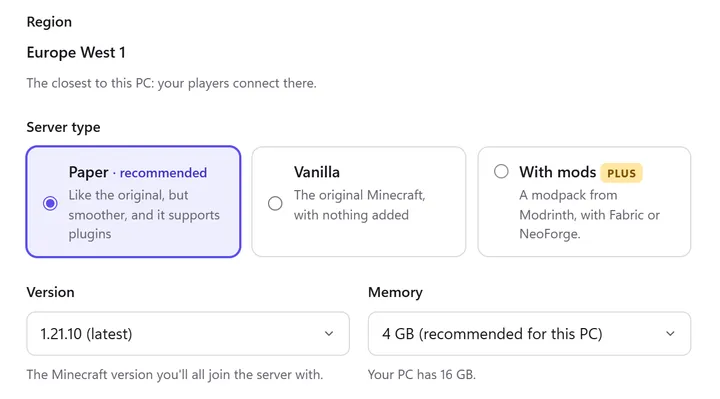
- Create the server. Choose Paper (recommended) or Vanilla. The latest Minecraft version and the memory are already selected. Accept the Minecraft EULA.
- Start the server and copy the address. When the server is online, the app shows its address with a Copy button.
- Add players to the whitelist. New servers only let in the players you add. Add their Minecraft names in the Players tab.
- Players join. In Minecraft: Java Edition they open Multiplayer, choose Add Server, paste the address and join. They don’t install anything else.
On a clean Windows PC, the whole process takes about 2 minutes from the download to the first player joining.
How it works
Your PC opens an outgoing connection to a LanWarp relay, the same kind of connection a browser opens to a website. Players connect to the relay with your server’s address, and the relay passes their connection to your PC through that link.
- Nothing to open on the router. The connection starts from your PC, so it also works behind CGNAT and on mobile connections.
- Your home IP stays private. Players only see the address of the relay.
- The server isn’t exposed. The Minecraft server on your PC only accepts connections from your own computer.
- Encryption stays between player and server. The relay reads only the address the player typed. Minecraft’s encryption and the Microsoft login are untouched.
When you create a server, the app measures the relays in Europe, North America and Oceania from your PC and picks the fastest one.
Other ways to skip port forwarding
| Method | How it works | Good to know |
|---|---|---|
| Tunnel programs, like playit.gg | You set up the server, then a program forwards it | You install Java, the server files and the tunnel, and keep both running. Compare with LanWarp |
| VPNs, like ZeroTier or Radmin VPN | Everyone joins the same virtual network | Every player installs the VPN. |
| Mods, like e4mc | Opens your singleplayer world to the internet | The world is online only while you play in it. Compare with LanWarp |
| Free hosts, like Aternos | The server runs on the host’s computers | When the host is full you wait in a queue, and the server stops when it’s empty. Compare with LanWarp |
| LanWarp | An app creates the server on your PC and gives it an address | Windows only, Java Edition only. The server is online while your PC is on. |
Common questions
Does it work behind CGNAT?
Yes. Your PC opens the connection to the relay, so LanWarp doesn’t need a public IP address or an open port.
Is it free?
The Free plan has 1 server and up to 10 players at once, with a random address and no time limit. Plus and Pro add more servers, more players, an address with the name you choose and cloud backups. See the plans.
Do players need to install anything?
No. Players use Minecraft: Java Edition and add the address in Multiplayer, like any other server.
Does the server run when my PC is off?
No. The server runs on your PC, so it is online while your PC is on and the server is started in LanWarp.
Can Bedrock Edition players join?
Not yet. Cross-play with Bedrock Edition will arrive in a coming update.