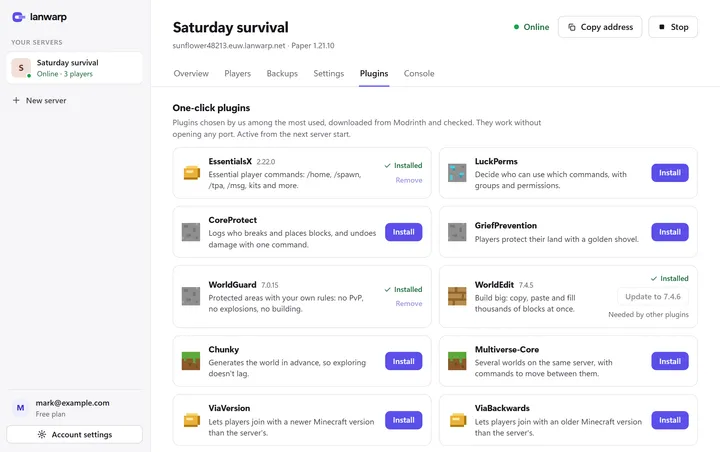
Mods or plugins
- Plugins run only on the server. Players join with normal Minecraft and install nothing. They need a Paper server.
- Mods change the game itself, so usually every player installs the same mods. A modpack bundles them, with a loader like Fabric or NeoForge.
If plugins are enough for you, a Paper server is the shortest way: LanWarp installs plugins from its catalog in one click on every plan, including the Free plan.
Create a modded server with LanWarp
Servers with mods are on the Plus and Pro plans.
- Create a server with mods. In the server creation, choose the option with mods and confirm that you understand what it means: players install the same modpack, the server needs more memory, and the mods come from other authors.
- Pick a modpack. LanWarp shows the Modrinth modpacks that can run as a server, on Fabric or NeoForge.
- Start the server. On the first start LanWarp downloads the server files of the modpack, checks each file and installs the loader. In our tests, a Fabric modpack with 125 mods was ready in about 2 minutes, and a NeoForge modpack with 266 mods in about 4 and a half.
- Share the modpack and the address. The Mods tab gives you the link of the modpack. Players install it in their launcher, for example the Modrinth App or Prism Launcher, then add the server address in Multiplayer.
Players join through a LanWarp relay, so there is no port forwarding on your router.
Good to know
- Mods only for the game. Some modpacks include mods that work only in the game and stop a server from starting. LanWarp recognizes them, moves them aside and starts the server again. The Mods tab lists them.
- Memory. Modpacks need more memory than Vanilla or Paper. Give the server more in its settings if it runs slowly.
- Version. The modpack decides the Minecraft version, so a modded server doesn’t move to newer versions.
- Loaders. Fabric and NeoForge are supported. Forge and Quilt aren’t.
- Stopping. Large modpacks need time to save the world. LanWarp waits up to 4 minutes before closing the server.
Common questions
Is a modded server free?
Servers with mods are on Plus and Pro. On the Free plan you can create a Paper server with plugins.
Do players need the mods?
Yes. Players install the same modpack in their launcher. The app gives you the link to share.
Can I use a CurseForge modpack?
Not today. LanWarp installs modpacks from Modrinth.
Can I add a single mod to a Paper server?
No. Paper runs plugins. For mods, create a server with a Fabric or NeoForge modpack.